
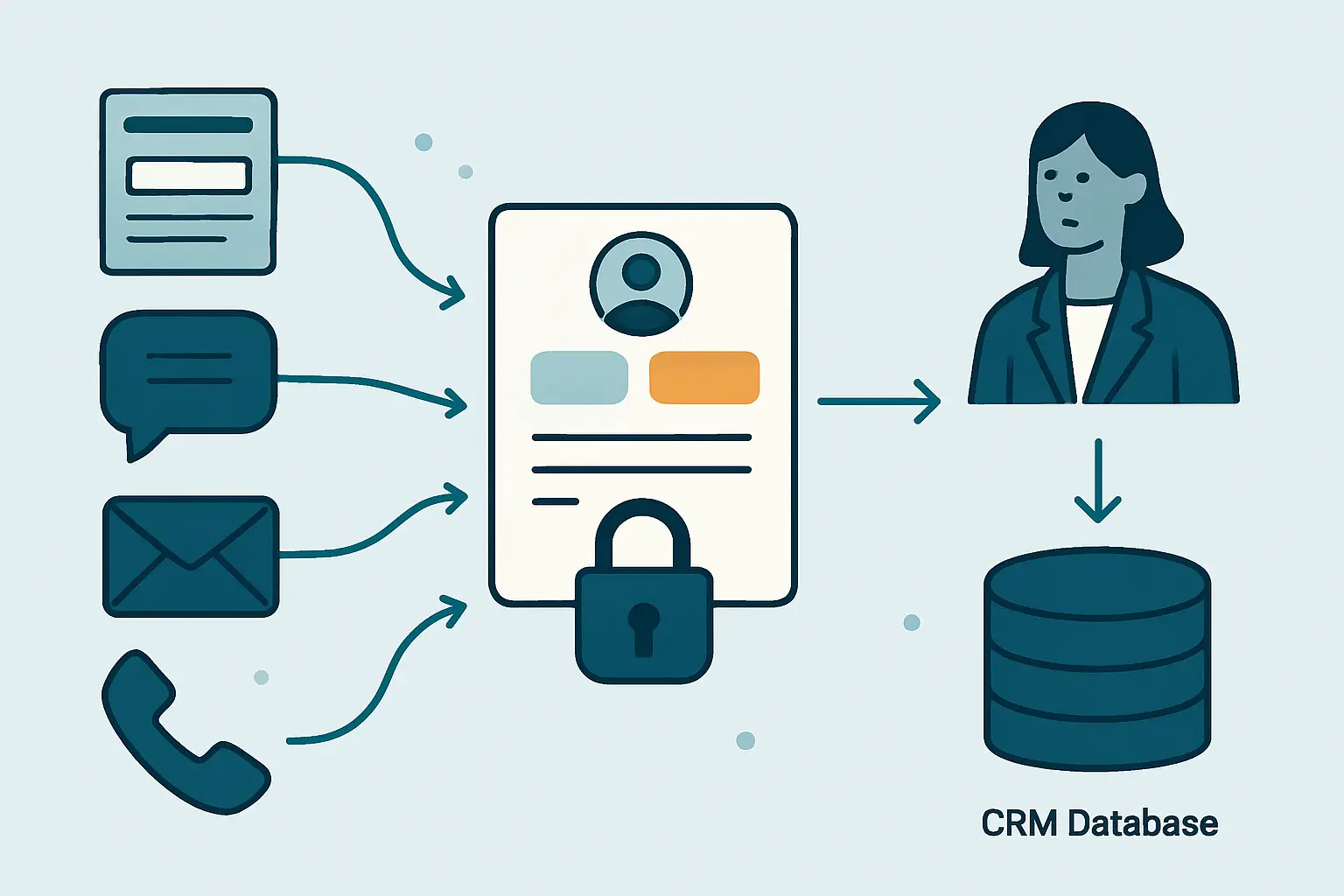
Lead capture and follow-up automation addresses a costly operational gap: an interested prospect submits a form, sends an email, starts a chat, or calls a business, yet the enquiry is not recorded, assigned, or acted on quickly enough. The issue is rarely a lack of effort from sales teams. More often, lead details sit across disconnected channels, ownership is uncertain, and follow-up depends on memory or manual inbox checks.
A reliable process connects each entry point to a central record, gives the right person useful context, and makes stalled activity visible. Businesses assessing system integrations or custom workflow automation for repetitive business processes can use this guide to define the rules, safeguards, and measurements needed before selecting technology.
Key Takeaways
- Centralize every enquiry
Forms, chat, email, calls, events, and campaign responses need a consistent route into one governed lead process.
- Automate the handoff
Assignment rules and alerts should route leads with context while retaining a visible owner and escalation path.
- Keep people in control
Automation can create tasks and reminders, but sales teams still need judgement for qualification, relationship building, and complex opportunities.
- Measure the gaps
Response time, ownership, activity completion, and unresolved exceptions reveal where enquiries are losing momentum.
How Lead Capture Automation Reduces Lead Leakage
Most missed opportunities are process failures rather than individual failures.
Lead leakage happens when an enquiry does not make a dependable journey from source to sales action. A website form may arrive in a shared inbox with no acknowledgement. A chat transcript may remain in a vendor platform. An event scan may be exported days later. A salesperson may receive an email but lack the account history, campaign context, or product interest needed to respond well.
Lead capture and follow-up automation gives teams a defined route for every enquiry, rather than assuming that a mailbox, spreadsheet, or individual memory will provide the handoff. These gaps can also create duplicate work. Marketing may report a form completion as a lead, while sales creates a separate contact record after a call. Neither team can see a complete activity history, and the prospect may receive inconsistent messages. The practical objective is not simply to send more automated emails. It is to establish a controlled path from enquiry to a qualified next action.
Common points of failure
Businesses commonly find problems at the boundaries between systems and teams: source data is incomplete, duplicate checking is inconsistent, territory rules live in a spreadsheet, or a reassignment after absence is handled informally. A workflow should make each of these conditions explicit. It should also record when an action was requested, completed, reassigned, or left unresolved so managers can investigate a process issue without relying on recollection.
Automated Lead Capture and Follow-Up Across Every Source
Lead capture and follow-up automation gives varied enquiry sources a controlled route into one accountable process.
Website and campaign forms
Capture form submissions with source, campaign, consent status, requested product or service, and the page or offer that prompted the enquiry. Preserve the original submission where appropriate for context and auditability.
- Contact details
- Source attribution
- Stated interest
Conversations and inboxes
Route live-chat requests, shared sales inbox messages, and relevant call notes into the same lead process. The workflow should retain the channel and conversation summary rather than treating every entry as an identical form.
- Channel context
- Conversation reference
- Response deadline
Events and partner referrals
Import or integrate event registrations, badge scans, partner referrals, and manually entered introductions using defined validation rules. These sources often require a review step before automated outreach begins.
- Referral source
- Permission review
- Named relationship owner
The central record is the operational anchor, not merely a database destination.
- Enquiry channels Forms, chat, shared email, calls, event tools, and partner referrals submit a lead or enquiry signal.
- Central lead record A CRM or governed lead store validates key fields, links existing records, preserves source context, and records consent.
- Routing and sales activity Rules assign ownership, create a response task, notify the responsible team, and track activity through qualification or closure.
Capture Complete Lead Data Without Creating Friction
Lead capture and follow-up automation works best when it asks for information that changes the next action, then enriches and verifies it responsibly.
Progressive data capture
Long forms can discourage genuine prospects, while short forms may leave sales teams without enough context to respond effectively.
Capture essential details first, then use later interactions, approved enrichment sources, or a follow-up conversation to complete the record.
- Lower submission friction
- Clearer next actions
- Fewer unnecessary fields
Duplicate-aware records
The same person may submit multiple forms, use an alternate email address, or contact the business through more than one channel.
Check for potential matches against existing contacts, accounts, open opportunities, and recent enquiries before creating a new lead or prompting a review.
- More coherent history
- Reduced duplicate outreach
- Better account context
Consent and source context
A lead record without its source, communication permission, or original request can lead to unsuitable outreach and weak reporting.
Store source metadata, consent indicators, submission time, and stated interest with the record, then apply communication rules before sequence enrolment.
- More appropriate messaging
- Stronger traceability
- Improved campaign analysis
Lead Follow-Up Automation Assignment Rules
Lead capture and follow-up automation should apply commercial routing rules while leaving room for controlled exceptions.
Territory or region
- Example decision
- Route based on the prospect location or account headquarters.
- Workflow behaviour
- Assign the relevant sales queue or representative and set an initial response task.
- Human accountability
- Sales operations maintains territory definitions and handles boundary disputes.
Product interest
- Example decision
- Route specialist enquiries to a team with the required product knowledge.
- Workflow behaviour
- Apply product-specific task guidance, relevant qualification fields, and supporting content.
- Human accountability
- The receiving team confirms that the enquiry fits its remit.
Account relationship
- Example decision
- Identify whether the contact belongs to an existing customer or named target account.
- Workflow behaviour
- Link the enquiry to the account and alert the established relationship owner where appropriate.
- Human accountability
- Account owners decide whether a new opportunity should be created or merged.
Priority and intent
- Example decision
- Flag high-value, time-sensitive, or clearly stated buying requests for faster attention.
- Workflow behaviour
- Create an elevated alert and escalation deadline instead of relying only on a standard queue.
- Human accountability
- A sales manager reviews priority logic and exceptional cases.
Lead Follow-Up Automation Sequences That Support Sales Teams
Lead capture and follow-up automation should create useful momentum while preserving room for personal judgement.
- 1
Create or update the lead
Accept the source event, validate required details, check for likely duplicates, and save source context in the central lead record.
A governed lead record with source and consent information
- 2
Assess route and urgency
Apply assignment rules based on territory, product, account relationship, stated intent, and defined priority criteria.
An accountable owner or monitored sales queue
- 3
Acknowledge the enquiry
Where appropriate, send a timely acknowledgement that confirms receipt and sets realistic expectations without making unsupported promises.
A recorded customer-facing acknowledgement
- 4
Create the first sales action
Generate a task, call prompt, or structured follow-up activity containing the relevant enquiry details, account context, and due time.
A specific action assigned to a person
- 5
Guide subsequent activity
If no meaningful action is logged, trigger reminders or approved sequence steps based on lead type, communication permission, and sales policy.
Visible, policy-aligned follow-up activity
- 6
Escalate or resolve
Escalate unowned, overdue, or high-priority leads to a defined manager or queue, then record qualification, disqualification, conversion, or closure reasons.
A traceable outcome and exception history
Measure Your Lead Capture and Follow-Up Process
Operational measures help teams improve lead capture and follow-up automation without confusing activity with revenue.
Lead capture and follow-up automation needs reporting that shows whether the process works at the handoff points that matter. Start with timestamps that already exist in the workflow: when the enquiry was received, when a lead record was created, when an owner was assigned, when the first meaningful activity occurred, and when the lead changed status. Review these measures by source, product line, territory, and team only where the data is sufficiently complete to support a fair interpretation.
Separate speed from quality
A fast automated acknowledgement is useful, but it is not the same as an informed sales response. Track both where possible. Similarly, a completed call task does not by itself prove that a prospect received suitable help. Pair operational measures with quality checks such as valid disposition reasons, duplicate rates, follow-up completion, and a review of leads left without an owner. This makes it easier to distinguish a workflow bottleneck from a qualification or messaging problem.
Reporting also needs a clear definition of what counts as a lead, a response, a qualified opportunity, and a closed outcome. Without shared definitions, teams may improve a dashboard number while creating inconsistent records that reduce trust in the CRM.
Operational Indicators Worth Monitoring
These are monitoring categories, not universal performance targets.
Measure the interval from lead receipt to a logged sales action, with source and priority context.
Identify new leads that remain unassigned or sit in queues without an accountable next step.
Review tasks completed, overdue, deferred, or closed without a documented outcome.
Monitor duplicate warnings, failed integrations, missing data, and repeated escalation conditions.
Implementation Checklist for Lead Capture and Follow-Up Automation
Use this checklist to turn an informal lead handoff into an operable workflow.
- Map every lead source
List forms, inboxes, chat tools, call processes, event platforms, referrals, and manual entry points. Identify the current destination and owner for each.
- Define the lead record
Agree the minimum required data, permitted source fields, consent requirements, duplicate checks, and the system that acts as the primary record.
- Document assignment logic
Specify territory, product, account, priority, queue, reassignment, and absence rules in terms that sales and operations can validate.
- Set response commitments
Define what a meaningful first action is for each lead type, who monitors overdue work, and what should trigger an escalation.
- Design exception paths
Create visible handling for missing fields, integration failures, duplicate uncertainty, inappropriate referrals, and leads without a valid route.
- Test realistic scenarios
Test duplicate submissions, existing customer enquiries, out-of-hours captures, staff absence, consent restrictions, failed notifications, and reassignment.
- Protect lead data
Apply role-based access, retention rules, audit logging, secure integration credentials, and appropriate privacy controls for personal information.
- Review and improve
Use reporting and sales feedback to refine rules, remove unnecessary alerts, improve data quality, and maintain ownership as teams change.
Lead Capture and Follow-Up Automation: From Interest to Action
A dependable lead process makes both customer experience and internal accountability easier to improve.
Effective lead capture and follow-up automation creates a shared operational record of what a prospect requested, who should respond, what happened next, and where intervention is needed. Its value comes from connecting channels, preserving context, applying transparent routing rules, and giving sales teams timely prompts rather than reducing relationships to automated messages.
Start with a manageable group of high-volume or high-value enquiry sources, then map the actual handoff from submission to a meaningful sales action. Define the minimum data required, the primary CRM record, the assignment logic, the response commitment, and the owner for each exception before configuring notifications or sequences. Test the process with realistic cases such as duplicate submissions, existing-customer enquiries, out-of-hours activity, staff absence, and failed integrations.
During the first operating cycle, review unassigned records, overdue tasks, duplicate warnings, and escalation reasons with sales and operations together. Compare the workflow record with a sample of real enquiries to confirm that source context, consent status, ownership, and activity history are being preserved as intended. Refine rules when they create confusion or unnecessary alerts, and retain human review for unusual, sensitive, or high-value decisions. Automation can improve visibility and consistency, but it cannot guarantee suitable qualification, compliance, or a successful commercial outcome without clear governance and informed sales judgement.
Conclusion
Lead automation works best when fast acknowledgement and routing are combined with clear qualification criteria, CRM ownership and sales judgement.
Review lead quality, response consistency, assignment exceptions and follow-up outcomes regularly so the workflow supports the sales process instead of creating more automated noise.
Frequently Asked Questions About Lead Automation
Practical answers to questions that arise when planning a connected lead response process.
What is lead capture and follow-up automation?
It is the use of connected workflows to collect enquiries from sources such as forms, email, chat, calls, and events; create or update a central lead record; assign ownership; generate follow-up activity; and escalate exceptions when required. The aim is to make the path from interest to sales action more reliable and visible.
Can automation replace sales follow-up?
No. Automation can acknowledge an enquiry, route it, create tasks, send approved communications, and surface overdue work. Salespeople still need to assess fit, understand context, respond to complex questions, build trust, and make judgement-based decisions about opportunities.
Which systems should connect to a lead follow-up workflow?
The answer depends on the business, but common systems include website forms, CRM platforms, shared email inboxes, marketing tools, chat platforms, telephony systems, event platforms, scheduling tools, and reporting environments. Prioritize systems that currently create manual copying, delayed ownership, or incomplete lead history.
How should duplicate leads be handled?
Use matching rules that identify likely duplicates without automatically merging records in every situation. A workflow can link an enquiry to an existing account or contact, alert the relationship owner, and route uncertain matches to a review queue. Human review remains important where records may belong to different people or legal entities.
What should trigger a lead escalation?
Typical triggers include no assigned owner, an overdue first-response action, a high-priority request, repeated unsuccessful contact attempts, a strategic-account enquiry, or an integration failure that prevents normal routing. Escalation rules should have an accountable recipient and a defined action, not simply generate another notification.
Connect Your Lead Sources and Sales Follow-Up Process
Review the handoff between your enquiry channels, CRM, routing rules, and sales responsibilities.
JiyanaTech can assess your current lead capture and follow-up process and design a maintainable automation solution around your forms, CRM, routing rules, integrations and sales responsibilities.