
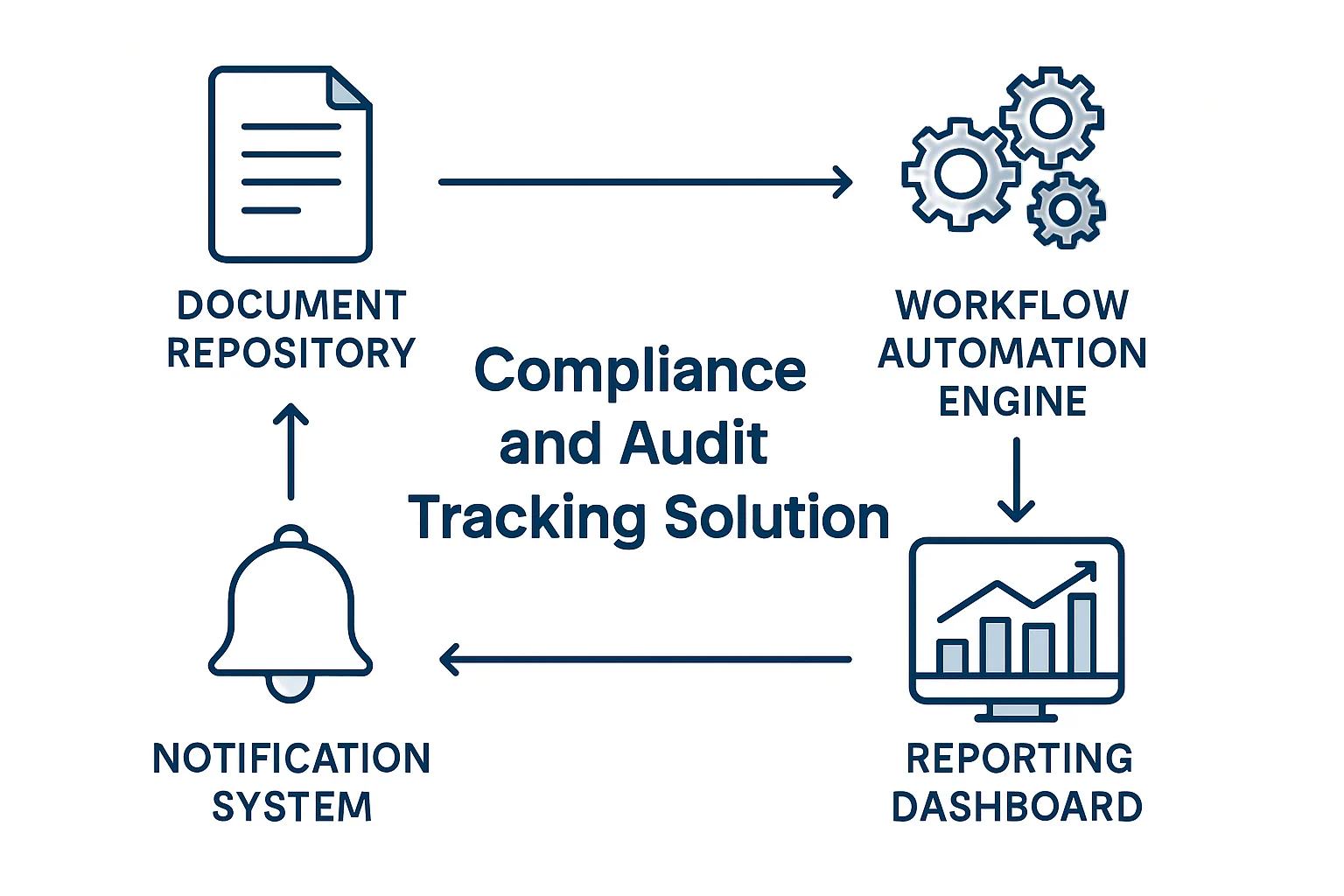
Compliance and audit tracking automation services help organizations turn recurring control work into a visible, accountable business process. Instead of locating evidence across inboxes, spreadsheets, shared drives, and informal follow-ups, teams can assign each requirement, request the right proof, record validation and approval decisions, and retain a history for later review. Consequently, control owners and reviewers can see what is due, incomplete, approved, or escalated without rebuilding the status from separate channels.
Automation does not interpret regulations or replace auditors, compliance leaders, or control owners. It can, however, make routine coordination more dependable. For example, document approval workflow automation can preserve review histories, while document automation services can help standardize evidence packs, attestations, and recurring audit documentation. In practice, compliance and audit tracking automation services work best when they support a defined control design and keep consequential judgement with qualified people.
Key Takeaways
- Treat controls as records
Each requirement should have a defined owner, due date, evidence expectation, review outcome, and retention rule; therefore, the record remains understandable after staff changes.
- Automate coordination, not judgement
Use rules for requests, reminders, routing, and status tracking while reserving sensitive or exceptional decisions for qualified reviewers.
- Design for exceptions
Missing evidence, failed checks, overdue reviews, and disputed findings need named owners and, consequently, an escalation route.
- Keep the audit trail usable
A useful history connects the requirement, submitted proof, reviewer decision, timestamps, changes, and final report output.
What Compliance and Audit Tracking Automation Services Cover
A controlled workflow connects compliance activities to the evidence and decisions that support them.
A compliance process is easier to manage when it is represented as a set of trackable records rather than a collection of reminders. In practice, a record may represent a control test, policy acknowledgement, supplier certification, access review, quality inspection, financial close task, corrective action, or audit request. It should identify what is required, why it matters, who is responsible, when it is due, and what evidence will demonstrate completion.
Compliance and audit tracking automation services can then create tasks at the right interval, send targeted requests, collect documents or form responses, and show the current state of each activity. When an item is complete, the workflow can retain the submitted evidence alongside the validation result and approval history. As a result, an audit team can retrieve a connected record instead of reconstructing events from disconnected systems.
Automation Should Fit the Compliance Control Environment
The appropriate solution depends on the volume of work, systems involved, data sensitivity, retention obligations, and reporting needs. For example, a smaller operation may use structured forms, a controlled document repository, and approval workflows. A larger or more complex environment may instead need API integrations, a central data model, custom applications, or reporting connections. However, technology should support the control design rather than force a compliance team to change necessary review practices.
With compliance and audit tracking automation services, every control activity can lead from a stated requirement to a retrievable audit output.
- Define the requirement First, record the obligation, control objective, frequency, scope, and expected evidence.
- Assign the accountable owner Then give a business role responsibility for providing evidence or completing the control activity.
- Request and validate evidence Next, collect the specified document, attestation, data extract, or test result and apply appropriate checks.
- Capture review and approval Meanwhile, store reviewer decisions, comments, timestamps, and any required sign-off.
- Retain the record Afterward, apply the approved retention location, access rules, version history, and disposition policy.
- Produce audit output Finally, filter the control register into a status report, evidence index, exception list, or audit package.
Where Manual Compliance Evidence Tracking Creates Risk
Manual coordination may work for a small number of activities; however, gaps become harder to see as obligations and teams grow.
Evidence Is Hard to Locate
Supporting documents are saved in personal folders, email threads, shared drives, or separate departmental systems.
Instead, create a control-linked evidence request with required fields, a designated submission location, and a record of each upload or update.
- Reduces searching across channels
- Connects evidence to its control
- Shows whether a request is complete
Due Dates Depend on Memory
Recurring certifications, access checks, policy acknowledgements, and tests rely on calendar reminders or manual follow-up.
Therefore, calculate due dates from a control schedule and issue reminders based on status, risk level, and time remaining.
- Makes upcoming work visible
- Supports earlier intervention
- Creates a repeatable cadence
Decisions Lack Context
A reviewer may approve an item in email without a durable link to the evidence, criteria, or version reviewed.
Route a complete review package to the appropriate role and, in turn, record the decision, comments, date, and related evidence version.
- Preserves decision context
- Improves handovers
- Supports later audit questions
Compliance Evidence Automation for Checklists and Attestations
When teams evaluate compliance and audit tracking automation services, the workflow should standardize routine coordination while allowing reviewers to handle unusual situations deliberately.
- 1
Create the control schedule
First, set the control frequency, scope, evidence specification, due date logic, reviewer role, and escalation thresholds.
Published control register - 2
Generate the activity record
Then open a dated control instance for the relevant entity, business unit, location, application, or reporting period.
Assigned compliance task - 3
Request structured evidence
Next, send the owner a focused request for the required file, form response, system extract, attestation, or explanation.
Submitted evidence package - 4
Check completeness and routing
Before review, confirm required fields, attachments, dates, and basic business conditions; otherwise, direct the item to an exception path.
Review-ready record or exception - 5
Record the reviewer outcome
Subsequently, capture approval, rejection, a clarification request, compensating action, or follow-up task with comments and timestamps.
Documented control decision - 6
Retain and report the result
Finally, store the linked history according to policy and update the control status, exception register, and reporting dataset.
Audit-supporting history
Audit Evidence Automation: Approvals, Logs, and Retention
In addition, compliance and audit tracking automation services should preserve a workflow history that answers what happened, who acted, and what was reviewed.
Requirement and scope
- What automation can capture
- Control identifier, period, entity, owner, due date, and evidence criteria
- Why it matters in review
- Therefore, reviewers can see what activity the evidence was intended to support.
- Human decision to retain
- Whether the defined requirement remains accurate and applicable
Evidence submission
- What automation can capture
- File references, form values, source links, submission date, and version history
- Why it matters in review
- This helps establish what was supplied and when.
- Human decision to retain
- Whether the evidence is sufficient, relevant, and authentic
Review and approval
- What automation can capture
- Reviewer identity, decision, comments, timestamps, and returned-for-change events
- Why it matters in review
- Consequently, the record provides a traceable decision history.
- Human decision to retain
- Whether approval, remediation, or further testing is appropriate
Retention and disposition
- What automation can capture
- Storage location, classification, retention trigger, access history, and disposal workflow status
- Why it matters in review
- In turn, this supports retrieval and records-management discipline.
- Human decision to retain
- Whether legal, contractual, or policy obligations alter the retention approach
Example: Automated Compliance Tracking for Quarterly Reviews
This illustrative scenario shows how compliance and audit tracking automation services could organize a recurring review without suggesting that automation determines compliance.
Start With the Review Register
A finance, quality, or technology team tracks quarterly controls in a spreadsheet, while supporting evidence arrives through separate email threads.
A workflow can create quarterly review records, assign owners, and request the documents or attestations tied to each control.
As a result, the team may gain a current view of outstanding evidence and reduce the effort required to assemble an initial review list.
Technology: Structured control register, forms, document repository, and workflow rules.
Manage Incomplete Submissions
Some owners submit an attachment without the reporting period, system reference, or explanation required for an effective review.
Therefore, intake rules can check required metadata and route incomplete submissions back to the owner with a targeted clarification request.
Reviewers can spend more time assessing meaningful exceptions instead of repeatedly identifying basic missing information.
Technology: Validation rules, conditional routing, and controlled notifications.
Prepare the Audit Package
Before an audit meeting, staff manually compile a status report, locate approved evidence, and reconcile late items from several sources.
The workflow can produce a filtered control report with linked evidence, reviewer outcomes, open exceptions, and documented remediation tasks.
Consequently, authorized users may prepare a more consistent evidence index while retaining the ability to verify each item.
Technology: Reporting dataset, document links, approval history, and exception register.
Security and Human Review in Compliance Workflow Automation
A well-designed automation protects sensitive records and, moreover, makes accountability visible when the routine path changes.
Protect Data and Access
Compliance evidence can include personal data, financial records, security information, contracts, or operational details. Therefore, access should be limited by role, sensitivity, and legitimate business need. Additionally, service accounts and integrations should use the minimum permissions required for their task.
- Apply role-based access and approved sharing rules
- Separate test and production environments where appropriate
- Log administrative changes to workflow rules and retention settings
Keep Judgement With People
Rules can identify missing fields, due dates, status conditions, and routing paths. However, qualified people should assess evidence quality, materiality, legal interpretation, policy exceptions, compensating controls, and remediation acceptance. Compliance and audit tracking automation services should make those decisions visible instead of concealing them behind an automated status.
- Require approval for sensitive exceptions
- Provide a route to override automated routing with reason
- Review rule changes when policies or regulations change
Questions Before Compliance Workflow Automation
A short discovery process can prevent the workflow from automating uncertainty, inconsistent definitions, or unowned exceptions.
- What is the control objective?
Document the obligation, risk addressed, scope, frequency, expected evidence, and criteria used to determine completion.
- Who provides and reviews evidence?
Identify the responsible business roles, reviewers, escalation contacts, and decision makers for exceptions.
- Where should evidence be retained?
Confirm the approved repository, access model, version handling, retention trigger, and disposition requirements.
- Which events require human review?
In particular, list decisions involving materiality, legal interpretation, privacy, security, financial impact, or unusual circumstances.
- What counts as an exception?
Define missing, late, incomplete, failed, disputed, or out-of-policy conditions and the response expected for each.
- Which systems hold key data?
Before selecting technology, map relevant repositories, identity systems, business applications, reporting tools, and integration constraints.
- How will changes be governed?
Set a process for updating control definitions, workflow rules, templates, approvers, and retention logic as obligations evolve.
- How will the workflow be monitored?
Similarly, assign responsibility for failed runs, delivery issues, access problems, configuration changes, and user support.
- What is the safe fallback?
Document how the team will continue or recover the control activity if an integration, notification, or repository is unavailable.
Make Audit Evidence Automation Easier to Defend
The value of automation is the connected history it creates around a control activity.
Effective compliance evidence is more than a file stored before a deadline. It is evidence connected to a known requirement, responsible owner, relevant period, review decision, and retention plan. Consequently, compliance and audit tracking automation services are most useful when they strengthen those connections and make outstanding work visible before an audit request arrives.
Begin with the operational questions that matter most: what must be proven, who decides whether it is sufficient, what happens when it is missing, and where the record belongs afterward. Once those answers are stable, workflow automation can coordinate routine work while preserving the human judgement that compliance requires. A reliable engagement for compliance and audit tracking automation services begins with a clear process boundary, accountable owners, and visible exception handling. Test the design with realistic data, document support responsibilities, and review operating evidence after launch before expanding it. Successful use requires practical alignment between people, process rules, data, and technology. Start with a controlled scope, include unusual and failure scenarios in testing, and use real operational feedback to guide each later improvement.
Successful compliance and audit tracking automation services requires practical alignment between people, process rules, data and technology.
Start with a controlled scope, include unusual and failure scenarios in testing, and use real operational feedback to guide each later improvement.
Compliance and Audit Tracking Automation FAQs
Answers to practical questions organizations often consider before improving compliance coordination.
No. Automation can coordinate evidence requests, reminders, approvals, records, and reporting; however, it cannot determine whether an organization meets every legal, regulatory, contractual, or policy obligation. Compliance interpretation and accountability remain human responsibilities.
Repeatable activities with defined triggers, owners, due dates, evidence requirements, and review paths are usually good candidates. For example, policy attestations, periodic access reviews, document expiry monitoring, internal control testing, quality inspections, and audit evidence requests can benefit from structured coordination.
At a minimum, retain the relevant requirement or control, responsible role, activity dates, submitted evidence reference, reviewer decision, comments, status changes, and exception or remediation history. The precise records should, however, follow the organization’s governance and retention requirements.
Not necessarily. Many organizations retain documents in an approved repository and store a secure link or reference in the workflow record. The best approach depends on access controls, records-management rules, integration capabilities, document size, and audit retrieval needs.
Custom development may be appropriate when the process needs complex control logic, a tailored control register, integrations with specialized systems, high-volume processing, detailed permissions, or reporting that cannot be reasonably supported by configured workflow tools alone.
Improve Your Control-Evidence Process
Review the business process your team uses to request, review, escalate, and retain control evidence.
JiyanaTech can assess your current compliance and audit tracking services process and design a maintainable automation solution around your systems, controls, integrations, security and support needs.
Discuss This Workflow