

Customer renewal management automation gives teams a more dependable way to prepare for recurring contracts, subscriptions, service agreements, and account reviews before deadlines become urgent. Rather than relying on individual spreadsheets, inbox reminders, and informal handoffs, a structured workflow can create renewal records, assign accountable owners, surface risk, and keep each decision traceable.
Renewals work best when they continue the information collected during automated customer onboarding and connect to the wider operating model supported by workflow automation consulting. The goal is not to remove people from commercial decisions; instead, it is to ensure the right people receive the right context early enough to act.
Key Takeaways
- Start before expiry
A renewal workflow should open work based on contract dates and account conditions, not when a deadline is already close.
- Keep one accountable owner
Automation can coordinate contributors, while a named renewal owner remains responsible for progress and customer outcomes.
- Use risk as a signal
Low engagement, unresolved issues, payment concerns, and missing documentation can trigger review without automatically deciding the outcome.
- Protect commercial controls
Pricing exceptions, non-standard terms, and material commitments should follow defined approval routes with an audit trail.
Customer Renewal Management Automation Challenge
Why renewal work becomes unreliable when dates, ownership, and customer intelligence are separated.
A renewal may appear straightforward: identify an approaching expiry date, contact the customer, agree terms, and record the result. In practice, the necessary information is often spread across a CRM, contract repository, support platform, billing system, spreadsheets, and individual inboxes. Consequently, an account manager can receive a reminder without knowing whether usage has declined, an invoice is overdue, or a service issue remains open.
Manual renewal management also makes ownership unclear. Sales may own the commercial conversation, customer success may know the relationship health, finance may need to validate payment status, and legal may need to review revised terms. If no shared process coordinates these roles, important steps can be delayed or duplicated. Therefore, customer renewal management automation should connect the work while preserving the decision-making responsibilities of each contributor. A renewal then becomes a planned customer conversation rather than a last-minute recovery exercise.
Why Calendar Reminders Fail Renewal Management Automation
A basic date reminder can prompt action, but it does not establish the correct renewal path. Different agreements have different notice periods, customer segments, pricing rules, approval requirements, and risk signals. Therefore, a useful solution combines time-based triggers with business rules, current account information, and clear human accountability.

Automated Customer Renewal Management Scenarios
Customer renewal management automation should support common scenarios without forcing every customer through the same sequence.
Standard Annual Renewal Automation
A recurring annual agreement has stable pricing and no material account concerns, yet the owner still needs enough time to confirm customer intent and update the record.
For a standard renewal, customer renewal management automation can open a case before the defined notice period, assign the account owner, prepare a communication draft, and remind the owner until an outcome is recorded.
- Consistent preparation timing
- Clear account ownership
- Documented customer outcome
At-Risk Customer Renewal Management
The customer has unresolved support issues, declining product use, or negative relationship signals that could affect the renewal conversation.
In contrast to a routine path, customer renewal management automation can flag risk indicators, create recovery tasks for the appropriate teams, and require a risk review before an ordinary renewal communication is sent.
- Earlier cross-team action
- More informed customer outreach
- Visible unresolved dependencies
Commercial Renewal Exception Automation
A customer requests a discount, amended payment terms, altered scope, or a multi-year commitment outside the standard commercial policy.
Accordingly, the renewal record can collect the proposed terms, calculate the required approval path from configured rules, and hold final documents until an authorized decision is recorded.
- Controlled exception handling
- Traceable approval history
- Reduced informal commitments
Multi-Entity Contract Renewal Automation
A parent customer renews services across several locations, legal entities, products, or regional account teams with related but different contract conditions.
Similarly, a parent renewal can coordinate linked child records, shared milestones, local owners, and consolidated status updates while allowing each agreement to retain its own dates and terms.
- Coordinated account view
- Local accountability
- Less duplicated follow-up
How Customer Renewal Workflow Automation Works
Customer renewal management automation makes the next required action obvious while retaining human judgement for commercial and relationship decisions.
Identify Eligible Renewal Agreements
First, customer renewal management automation reviews active agreements against renewal windows, contract status, notice clauses, and exclusion conditions such as an already-open renewal.
Eligible renewal listCreate Customer Renewal Workspace
Next, the system opens or updates a central renewal record and links the account, agreement, dates, historic activity, documents, and prior commercial context.
Single renewal recordAssess Renewal Account Readiness
Then, connected data and structured questions help the owner review relationship health, product use, open cases, billing status, customer objectives, and renewal likelihood.
Readiness assessmentCoordinate Customer Renewal Engagement
Meanwhile, the owner selects or approves the right outreach while the workflow records communication activity, follow-up dates, meeting outcomes, and required internal actions.
Engagement planRoute Renewal Approvals
Where proposed terms exceed defined thresholds, the workflow routes the request to the appropriate authority and retains the rationale, documents, and decision.
Approved commercial positionRecord and Synchronize Renewal Outcome
Finally, the signed, lost, delayed, or cancelled outcome updates the renewal record and relevant connected systems, then closes outstanding work or starts follow-up actions.
Auditable renewal outcome
Customer renewal management automation should apply timeline rules that reflect the agreement and customer, rather than one fixed reminder period for every renewal.
- Preparation Window Initially, customer renewal management automation can open the renewal record at a configurable point based on contract length, notice requirements, value, and customer complexity.
- Health Review Before outreach, prompt an internal review when account health, service history, or payment status needs attention.
- Customer Engagement Then, schedule approved communications and follow-up tasks according to the customer's agreed relationship cadence.
- Decision Deadline As the commercial or contractual decision point approaches, escalate incomplete internal work.
- Closure Follow-Up After the outcome, trigger signing, implementation, offboarding, recovery, or reporting actions as appropriate.
Renewal Management Automation Tasks and Ownership
Customer renewal management automation can coordinate responsibility; however, each renewal should still have a named owner who is accountable for progress.
Customer relationship and next step
- Typical accountable role
- Account manager or customer success owner
- How automation supports it
- Assigns the renewal, sets follow-up dates, records activity, and escalates inactivity.
Commercial proposal and pricing
- Typical accountable role
- Sales owner or commercial manager
- How automation supports it
- Pre-populates approved pricing context and routes non-standard terms for review.
Financial and contractual checks
- Typical accountable role
- Finance, legal, or contract operations
- How automation supports it
- Requests validation tasks when payment status, terms, tax, or documentation requires review.
Final renewal status
- Typical accountable role
- Named renewal owner
- How automation supports it
- Requires an outcome, reason code, supporting documents, and completion of linked follow-up actions.
Customer Renewal Communication Automation
Customer renewal management automation should reduce administrative effort while keeping account conversations relevant and human-led.
Automate the administrative layer
Customer renewal management automation can prepare approved email templates, create reminders, log correspondence, schedule follow-up tasks, and notify internal contributors when a customer responds. As a result, customer-facing teams do not need to rebuild routine messages or manually update several records after each interaction.
- Use templates with controlled placeholders
- Log messages against the renewal record
- Trigger follow-up when no response is received
Keep judgement with the owner
However, the renewal owner should decide when to personalize, pause, or change the communication. For example, a customer with an active service issue may need a recovery conversation before a standard renewal message. Similarly, strategic accounts often require tailored engagement plans rather than a fully automated sequence.
- Require owner review for sensitive accounts
- Respect communication preferences
- Avoid automated commitment language
Contract Renewal Automation Approvals
Customer renewal management automation should make approvals proportionate to the decision and should not slow down routine renewals that already meet policy.
- Set policy thresholds
First, use customer renewal management automation to define which discount levels, contract values, payment terms, liability changes, or service commitments require review.
- Capture the rationale
Then, require the requestor to explain the customer need, commercial context, proposed terms, and alternatives considered.
- Attach supporting evidence
In addition, link the relevant proposal, contract version, account history, financial context, and customer correspondence.
- Route by decision type
Instead of using one generic approver, send financial, legal, security, and commercial exceptions to the appropriate authority.
- Set escalation rules
When an approval remains unresolved close to a contractual or commercial deadline, notify a backup or manager.
- Preserve the decision trail
Finally, store the approver, date, comments, outcome, and approved terms with the renewal record for later reference.
Automated Customer Renewal Management Workspace
A shared workspace gives contributors a current operational view without replacing the specialist systems they rely on.
A renewal workspace is the operational home for one renewal. Customer renewal management automation can support it in a CRM, a purpose-built business application, a Microsoft 365 and SharePoint solution, or another platform suited to the organization. The important principle is that the workspace links people and decisions to source systems rather than creating a second, unmanaged copy of important data.
At minimum, the record should show the agreement and customer, renewal date, notice period, owner, current stage, expected outcome, next action, outstanding tasks, risk indicators, communication history, approval status, and supporting documents. Additionally, it should make clear when data was last synchronized and where an item originated. That provenance, in turn, helps users validate information before relying on it.
Design for Contract Renewal Automation Exceptions, Not Only the Ideal Path
A practical workspace must accommodate delayed decisions, customer-requested extensions, replacements by a new agreement, partial renewals, lost renewals, and renewals that need legal or security review. Therefore, workflow states and reason codes should reflect real operational outcomes instead of forcing users to select inaccurate statuses simply to close a record.
Renewal Management Automation Pipeline and Visibility
Customer renewal management automation gives leadership and delivery teams a current view of renewal work without chasing status updates across multiple departments.
A single view can group renewals by stage, expected timing, owner, segment, and outcome status.
Meanwhile, overdue tasks, missing approvals, uncontacted customers, and elevated risks can be surfaced for intervention.
As a result, teams can review who changed terms, approved exceptions, contacted the customer, and recorded the final outcome.
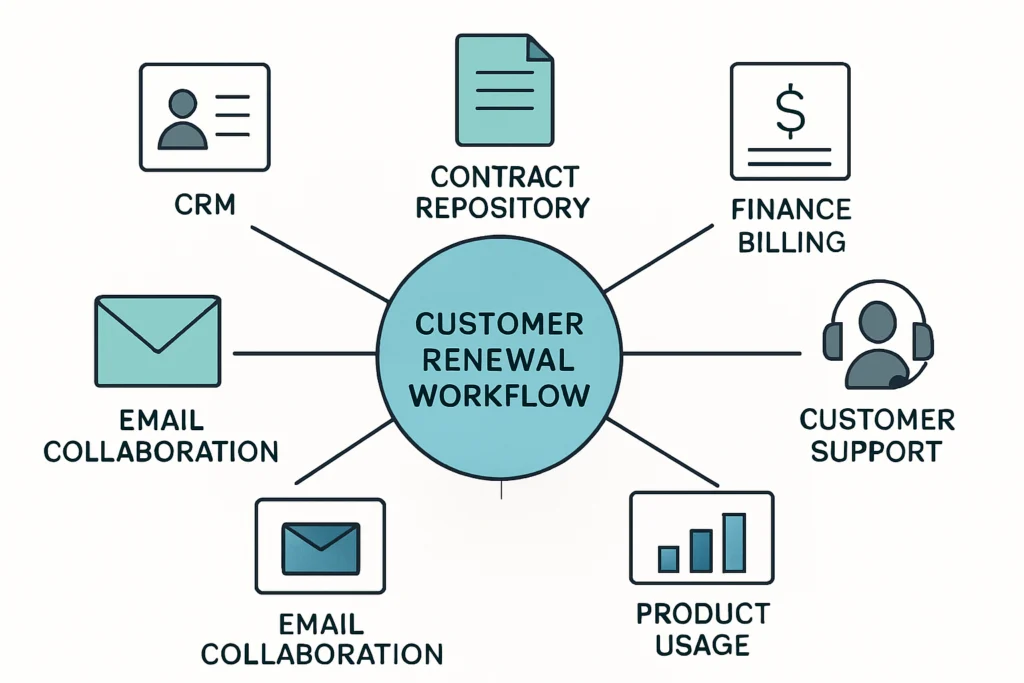
Integration with Existing Business Systems for Contract Renewal Automation
Customer renewal management automation depends on where reliable data lives, how frequently it changes, and what controls the business requires.
CRM or Account Platform
For example, customer ownership, opportunities, relationship notes, renewal stage, and commercial activity commonly originate in a CRM or account management system.
Contract Repository
Similarly, the workflow may reference effective dates, notice periods, contractual terms, document versions, and signature status from a controlled contract location.
Finance and Billing System
Before a renewal is finalized, invoice status, payment terms, credit considerations, and billing contacts may need validation.
Customer Support Platform
In particular, open cases, service trends, escalation status, and customer-impacting issues can provide useful context for relationship and risk reviews.
Product Usage Data
Where appropriate and reliable, product activity or service consumption data can support a structured account-health discussion before renewal.
Email and Collaboration Tools
Finally, messaging, task notifications, meeting follow-ups, and internal approvals can be coordinated through approved communication and collaboration systems.
Building a Reliable Automated Customer Renewal Operation
The most useful renewal workflows improve readiness without treating every customer decision as a routine transaction.
Customer renewal management automation is most effective when it creates a dependable operating rhythm: prepare early, assemble relevant context, assign accountable owners, surface exceptions, and record decisions clearly. Consequently, teams can spend less time locating information and more time resolving customer needs before the renewal deadline.
However, good automation does not replace commercial judgement or relationship management. Instead, it supports those activities by making tasks, approvals, communications, risks, and system updates easier to coordinate. A well-designed workflow should remain flexible enough for real customer circumstances while preserving the controls needed for financial, contractual, and operational decisions.
Renewal Management Automation FAQs
Direct answers to common planning questions about automated customer renewal management.
Customer renewal management automation uses workflow rules, connected business data, tasks, notifications, approvals, and records to coordinate contract or subscription renewals. It can automate repeatable administrative work while leaving customer strategy, pricing decisions, and exceptions with the appropriate people.
The correct start point depends on the agreement's notice period, value, complexity, customer segment, procurement process, and relationship history. Therefore, many organizations use configurable preparation windows rather than one fixed number of days for every contract.
Yes. A workflow can identify when a proposed price, discount, payment term, or commitment falls outside policy and route it to the correct approver. It should capture the rationale, supporting documents, decision, and approved terms rather than automatically approving commercial exceptions.
A renewal process commonly connects to a CRM, contract repository, billing or finance system, customer support platform, communication tools, and sometimes product usage data. The right integrations depend on which systems hold reliable information needed for renewal decisions.
No. Standard low-risk renewals can follow a lighter path, while strategic accounts, at-risk customers, multi-entity agreements, and non-standard commercial requests may need additional reviews, tasks, and approvals. Consequently, configurable paths are usually more practical than a single rigid process.
Need Help With Automated Customer Renewal Management?
Discuss a practical approach to connecting renewal tasks, data, approvals, and communications.
JiyanaTech can assess your current customer renewal management process and design a maintainable automation solution around your systems, controls, integrations, security and support needs.
Discuss This Workflow