

Partner portal automation gives organizations a structured way to work with resellers, distributors, referral partners and service providers without relying on disconnected inboxes, spreadsheets and shared folders. Instead, a portal can guide information through defined stages, keep the right people informed and make routine requests easier to track.
The most effective solution is not simply a login page; rather, it is a governed operating layer between internal teams and external partners. Organizations planning a portal can also apply lessons from account management automation and use workflow automation consulting to connect approvals, CRM records, document repositories and notifications around real business rules.
Key Takeaways
- Centralize partner interactions
A portal provides one controlled place for applications, profiles, deals, leads, documents and learning records.
- Automate repeatable routing
Consequently, rules can validate submissions, route approvals, create tasks and notify the appropriate internal or partner users.
- Protect commercial data
Role-based access, approval gates and audit trails can therefore help limit exposure of leads, pricing and confidential documents.
- Keep deal ownership visible
Deal registration workflows can record submissions, detect possible conflicts and, in turn, support transparent review decisions.
- Support partner enablement
In addition, training, certifications and current resources can be delivered through a consistent partner experience.
- Retain human judgement
However, high-risk approvals, legal checks, exceptions and sensitive commercial decisions should remain subject to human review.
Partner Management Portal Automation Challenge
Why partner relationships become difficult to manage as programs expand.
Partner programs often start with manageable manual processes: a form arrives by email, a manager checks the applicant, sales receives a spreadsheet and marketing shares a folder of collateral. However, this approach becomes unreliable as the number of partners, regions, products or partner tiers grows.
Information can be duplicated across a CRM, an email inbox, a finance system and several document libraries. Consequently, teams may struggle to answer basic operational questions: Which partners are active? Who approved a deal? Which version of the price list was shared? Does a partner still hold a required certification?
Manual work creates commercial and governance risk
The issue is not only administrative effort. For example, delayed approvals can slow partner activation, unclear deal ownership can create channel conflict, and uncontrolled document sharing can expose confidential material. A well-designed portal gives each activity a defined owner, status, record and next action. In this way, partner portal automation supports a more dependable partner experience while preserving internal control.
Automated Partner Portal Use Cases
The same portal pattern can support different partner programs when workflows reflect the organization’s actual commercial rules.
Reseller enablement hub
Resellers need approved collateral, product training and a straightforward way to register opportunities, while internal teams need visibility over participation.
The portal can assign onboarding content, publish approved assets by partner tier and route deal registrations to sales operations.
- More consistent partner information
- Clearer deal submission status
- Less manual resource distribution
Distributor coordination
Distributors may manage many downstream contacts, product lines and territories; consequently, manual account updates can be difficult to reconcile.
A structured profile workflow can collect changes, request internal validation where needed and synchronize approved data with connected systems.
- Controlled account updates
- Better territory visibility
- Traceable change history
Referral partner program
Referral partners need a low-friction path to submit prospects, whereas the business needs a fair and auditable method for confirming follow-up.
The portal can capture referral information, check minimum requirements, notify an internal owner and return an outcome to the referring partner.
- Standardized referral capture
- Defined acknowledgement process
- Reduced inbox dependency
Partner Portal Workflow: How It Works
Partner portal automation provides a front door for partners while workflow rules coordinate actions across operational systems.
Partner submits information
First, a prospective or existing partner completes a guided form for registration, profile updates, deal registration or a support request.
Structured submission recordRules check completeness
The workflow then checks required fields, permitted values, duplicates and basic eligibility conditions before requesting staff time.
Validated or returned requestAppropriate owner reviews
Based on partner type, territory, value or risk, the request is routed to channel, sales, legal, finance or compliance reviewers.
Decision task and audit entryConnected records update
After approval, information can create or update records in a CRM, partner database, document repository or learning platform through suitable integrations.
Aligned operational recordsPortal status is refreshed
Meanwhile, the partner sees the current status, requested actions and information they are allowed to access without relying on email follow-up.
Self-service visibilityActivity remains traceable
Finally, key submissions, decisions, access events and document acknowledgements are retained according to the organization’s governance requirements.
Auditable activity history
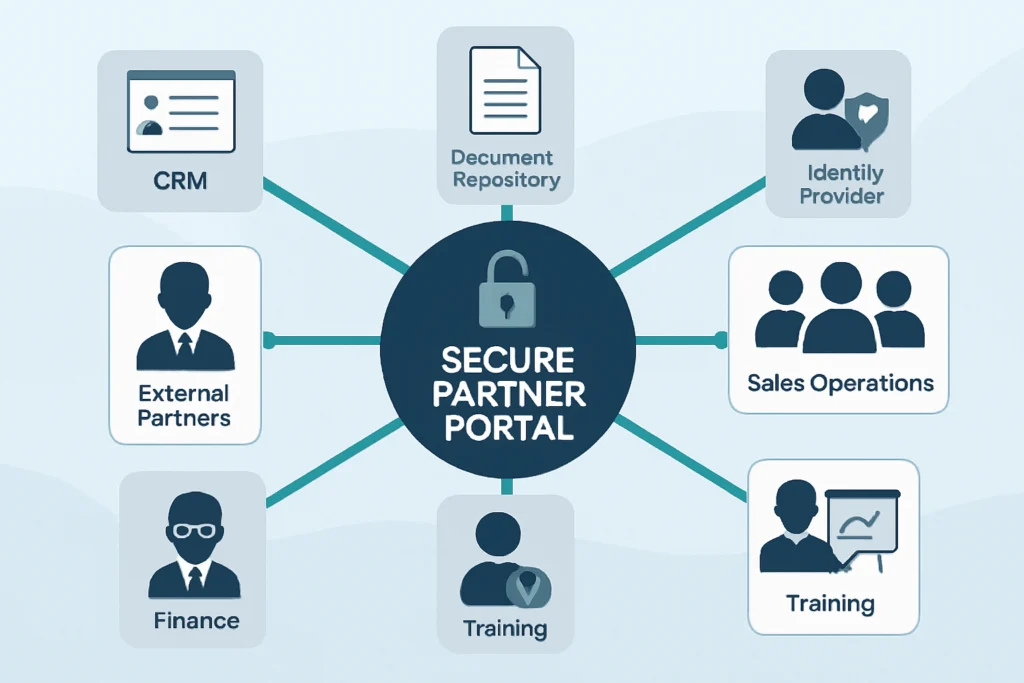
A portal should present a simple experience while trusted business systems remain the source of record where appropriate.
- Partner users Partners submit information, view permitted resources, track requests and maintain approved profile details.
- Partner portal The portal applies forms, role-based views, statuses, validations and self-service interactions.
- Workflow layer In turn, the workflow layer routes decisions, sends notifications, records activity and coordinates integrations.
- CRM or sales platform This platform holds accounts, contacts, leads, opportunities and commercial ownership information.
- Document platform The repository stores controlled collateral, agreements, policies and partner-facing resources.
- Identity and learning services These services support authentication, access control, training assignments and certification evidence.
Partner Portal Workflow Onboarding
Partner portal automation should collect enough information for an informed decision without making the first interaction unnecessarily long.
- Define partner categories
First, separate reseller, referral, distributor, service and alliance partner paths when their requirements or approvals differ.
- Collect justified data
Request only information needed for qualification, contracting, tax, compliance, territory or contact management.
- Set required evidence
Specifically, define documents, declarations or supporting information that must be submitted before a review can begin.
- Use staged completion
Allow applicants to save progress where applications require multiple contributors or supporting materials.
- Assign onboarding actions
After approval, issue welcome tasks such as accepting terms, completing training or adding key contacts.
- Confirm activation criteria
Therefore, make active status dependent on clearly defined commercial, legal, security and enablement requirements.
Partner Portal Workflow: Profile Management
With partner portal automation, a useful profile becomes a controlled shared record rather than merely a directory entry.
Partner self-service updates
Partners can request changes to contacts, company details, locations, expertise, supported products or marketing preferences. As a result, routine email traffic can fall and partners gain a clearer view of the information held about them.
- Draft and submit profile changes
- Show field-level guidance
- Display current approval status
Internal data governance
Not every profile field should update automatically. For example, changes to legal names, payment details, territory assignments, account ownership or partner tier may require internal review before connected records change.
- Route high-impact changes
- Keep prior values in history
- Set periodic review reminders
Automated Partner Portal Approval and Verification
Partner portal automation can support verification controls whose depth matches the relationship type, commercial exposure, geography and applicable internal policies.
Initial qualification
- What the workflow can do
- First, check required fields, partner type and basic completeness before routing.
- Human review needed
- Confirm strategic fit and route exceptions.
- Record to retain
- Application submission and reviewer notes.
Identity and company checks
- What the workflow can do
- Request declared company information and supporting evidence in a controlled location.
- Human review needed
- Assess evidence quality and perform required due diligence.
- Record to retain
- Verification outcome and evidence references.
Commercial approval
- What the workflow can do
- Then route based on territory, product line, proposed tier or ownership rules.
- Human review needed
- Approve commercial terms and resolve conflicts.
- Record to retain
- Decision, approver and effective date.
Activation and renewal
- What the workflow can do
- Confirm prerequisite tasks, training or documents and create review reminders.
- Human review needed
- Approve activation, suspension, renewal or exceptions.
- Record to retain
- Status history and renewal decision.
Automated Partner Portal Deal Registration
A deal registration process helps partners understand how to submit opportunities and how internal teams will assess them.
Deal registration management is frequently one of the highest-value parts of a portal because it brings commercial coordination into a traceable process. In a mature partner portal automation process, a partner submits the prospective customer, relevant contacts, expected value range, product interest, timeline and supporting context. The portal can then confirm receipt immediately and display a status rather than leaving the partner to ask for updates.
Use automation for consistency, not automatic entitlement
Rules can identify missing information, possible duplicate accounts, territory mismatches or registrations that require additional review. However, a workflow should not automatically award ownership simply because a form was submitted first. Sales leadership may need to evaluate existing pipeline, account relationships, contract terms and the quality of partner contribution before deciding.
When the decision is made, the portal can notify the partner, record the rationale where appropriate and set follow-up dates. As a result, partner portal automation can support fairer, more consistent handling without removing the commercial judgement needed in complex situations.
Channel Partner Portal Lead Sharing
Partner portal automation can coordinate lead sharing when assignment, acknowledgement and follow-up expectations are explicit.
Assign eligible leads
Internal teams may have limited visibility into whether a partner is eligible, active, trained or aligned to the relevant product and territory.
Use profile, tier, region and certification data to suggest or restrict lead assignment choices before a lead is shared.
Consequently, channel teams can apply assignment policy more consistently and reduce avoidable reassignment work.
Track acknowledgement
A lead sent by email can sit unanswered, leaving internal teams unsure whether the partner received it or intends to act.
Present acknowledgement and acceptance actions in the portal, then notify the internal owner if a response is overdue.
As a result, the business may gain clearer visibility into the handoff while partners receive a defined next step.
Manage shared opportunities
Joint opportunities can involve multiple contributors, documents and changing responsibilities across sales and partner teams.
Provide a controlled workspace for permitted updates, milestone requests, supporting files and escalation paths.
This approach can improve coordination while retaining internal approval for pricing, contracts and sensitive customer decisions.
Automated Partner Portal Document Management
Partner portal automation can help partners find the latest approved materials while giving content owners control over visibility and lifecycle.
Controlled resource library
Store partner-facing playbooks, product sheets, policies, technical resources and approved marketing assets in a structured repository.
Targeted document access
Show resources by partner type, product authorization, region, tier or lifecycle status instead of publishing every file to every user.
Review and expiry workflows
In addition, notify document owners when content needs review, archive superseded files and prompt partners to acknowledge important policy changes.

Partner Management Portal Automation Governance
Technology should follow the process design, integration needs and risk profile of the partner program.
An automated partner portal can be delivered through different approaches. A low-code platform may suit structured forms, approvals, notifications and Microsoft 365-connected document workflows. In contrast, a custom web application may be more appropriate when the organization needs a highly tailored external experience, complex commercial rules, significant scale or integrations beyond standard connectors. In many cases, a mixed approach is practical.
Before selecting technology, map partner journeys, identify source systems, define ownership for each decision and agree which data partners can see or change. Additionally, decide how exceptions will be handled. A partner portal automation program that handles only the standard path without a clear escalation route can simply move confusion from email to a queue.
JiyanaTech typically recommends starting with a small set of high-volume, high-friction workflows—such as registration, deal submission or controlled document access—then expanding once the data model, permissions and review responsibilities are proven. This phased approach can reduce unnecessary complexity while keeping the architecture ready for future integrations. Therefore, partner portal automation should be planned as an operating capability rather than a collection of disconnected forms.
Partner Portal Automation for Governed Collaboration
The strongest portal designs balance self-service convenience with clear commercial and security controls.
A partner portal is valuable when it gives partners a simple, dependable path for the work they need to do and gives internal teams reliable records for the decisions they must make. Registration, access, deals, leads, documents and certifications should not operate as isolated features; instead, they should follow a connected set of rules and ownership responsibilities.
When designed around real partner journeys, partner portal automation can reduce repetitive coordination, improve visibility and support more consistent governance. Ultimately, the right approach keeps routine actions moving automatically while reserving sensitive, high-value and exceptional decisions for informed human review.
Partner Portal Workflow FAQs
Key considerations for organizations evaluating a partner portal solution.
Partner portal automation uses a secure portal and connected workflows to manage repeatable partner activities such as registration, approvals, profile changes, deal submissions, lead sharing, document access, training and status notifications. The goal is to reduce manual coordination while keeping business rules and accountability visible.
Start with processes that create frequent manual follow-up, inconsistent records or avoidable delays. For example, partner registration, profile updates, deal registration, controlled resource access and certification reminders are often suitable starting points. The best priority depends on volume, business risk, integration readiness and the clarity of existing rules.
Yes. A portal can integrate with a CRM or sales platform so approved partner, lead, account and opportunity information is shared according to defined rules. The CRM should normally remain the source of record for commercial data where that is already the established operating model. In addition, integration design should address duplicate prevention, ownership, error handling and data synchronization responsibilities.
Partners can usually update routine details such as contacts, expertise and preferences. However, high-impact information—such as legal entity data, payment details, territory assignments, account ownership or tier status—should normally be routed for internal review before connected systems are updated.
Use authenticated access, role-based permissions, partner-organization boundaries, approval-controlled access changes and logging appropriate to the business context. In particular, confidential pricing, customer details, contracts and internal-only documents should be visible only to users with a clear business need. Regular access reviews and offboarding workflows are also important.
No. The appropriate solution depends on workflow complexity, branding needs, integrations, user volume, security requirements, licensing, internal support capability and budget. While some organizations can use configurable portal and workflow tools effectively, others need a custom application or a mixed architecture for more specialized requirements.
Plan Your Partner Portal Workflow
Discuss the partner processes that create the most manual coordination and identify a controlled next step.
JiyanaTech can assess your current partner portal process and design a maintainable automation solution around your systems, controls, integrations, security and support needs.
- Free consultation
- Discuss the partner workflows creating the most manual work and identify practical automation options.