
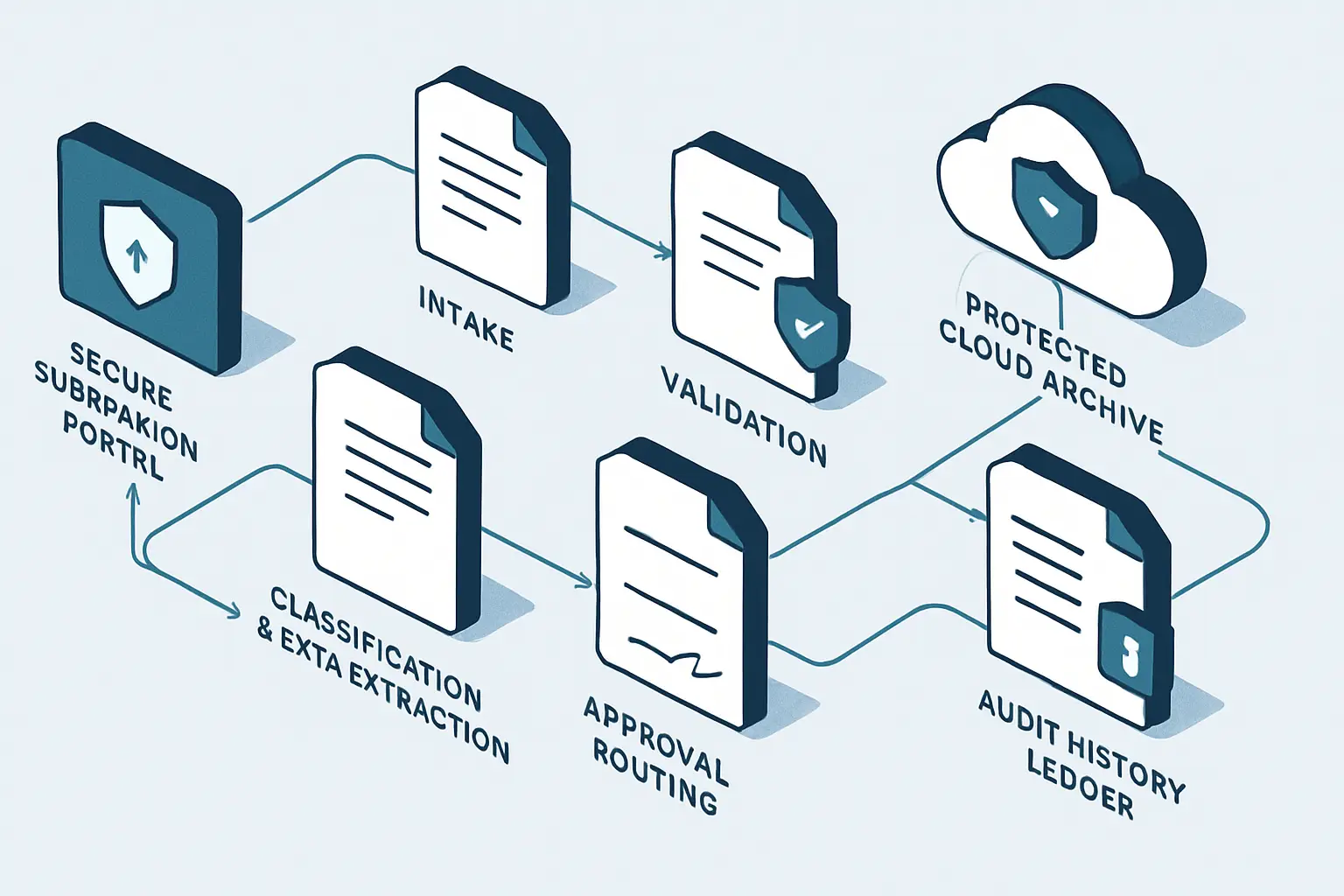
When forms, invoices, contracts and internal requests move through inboxes, shared folders and spreadsheets, teams often lose time finding the latest version, correcting copied data and chasing the next reviewer. As a result, document automation services create a more controlled path for recurring business documents: information can be captured once, checked against rules, routed to the right people and stored with a usable history.
The best result is not simply a faster file transfer. Instead, document automation services establish a process with defined ownership, exceptions and records. In addition, businesses exploring broader workflow automation services can apply the same thinking to document-heavy operations, while a document approval workflow guide can help teams examine the review stage in more detail.
Key Takeaways
- Automate the lifecycle
A dependable approach considers intake, validation, generation, approvals, storage, retention and audit history together.
- Start with repeatability
Documents with standard inputs, clear routing rules and frequent handling are usually stronger automation candidates than highly bespoke work.
- Keep exceptions visible
Missing details, low-confidence extraction and unusual requests should enter an owned review path rather than silently continue.
- Design for control
Permissions, version rules, retention schedules and audit records should be defined before a workflow goes live.
What Document Automation Services Include
Document automation is broader than generating a file from a template. Instead, document automation services coordinate the information, decisions and controls surrounding a business document.
Document intake automation
A form, inbox, portal or connected system captures a request and, therefore, applies required fields before the work reaches a reviewer.
- Required information checks
- Reference-number capture
Document classification and extraction
The workflow identifies document type and then retrieves useful data such as supplier details, dates, amounts or customer identifiers for validation.
- Document-type rules
- Confidence-based review
Automated document creation
In addition, approved information can populate controlled templates for letters, proposals, agreements, certificates, reports or other repeatable outputs.
- Approved templates
- Consistent naming rules
Document approval workflow
Similarly, routing logic sends documents to the correct reviewer based on value, department, document type, location or another defined business rule.
- Escalation timing
- Decision recording
Secure document storage
Afterward, final documents and their supporting records are filed in an appropriate repository with permissions, metadata and version history.
- Role-based access
- Searchable metadata
Document retention and auditability
Likewise, retention actions and activity records help teams understand what happened, when it happened and which person or system made a decision.
- Retention events
- Traceable activity history
Business Document Automation: Documents to Prioritize
A document does not need to be paper-based to create manual work. In practice, the strongest candidates have recurring steps, predictable data and a known destination.
Invoice Business Document Automation
For example, accounts teams may re-key supplier details, match documents to purchase information and repeatedly follow up for approvals.
Therefore, a workflow can capture invoice data, validate key fields, route exceptions or approvals, and file the resulting record with relevant references.
- Less repeated data entry
- Clearer approval status
- Easier document retrieval
Contract Document Workflow Automation
Meanwhile, legal and operational teams can struggle with inconsistent clauses, unclear version status and delayed reviews across stakeholders.
For example, approved templates can collect deal information, route clauses or drafts for review, and preserve the signed version with its approval history.
- More consistent documents
- Defined review routes
- Improved version visibility
HR Document Workflow Automation
Similarly, onboarding, policy acknowledgements and employee changes often require repeated collection of information from several departments.
Accordingly, teams can collect employee data through controlled forms, generate standard letters or checklists, notify owners and store records in the correct location.
- Fewer missed handoffs
- Consistent employee records
- Better progress tracking
Client Document Workflow Automation
In practice, service teams may build similar proposals, engagement letters, completion reports or customer updates from scattered information.
A controlled template can, in turn, use approved customer and service data, request review when needed and publish the completed document to the right channel.
- Faster document assembly
- More reliable client details
- Consistent service records
The Document Workflow Automation Lifecycle
A well-designed process makes each stage explicit. Consequently, a person can investigate an exception or make a judgement at the appropriate point.
- 1
Capture the request
Receive information through a form, mailbox, portal, scanner or connected business application. Then record the source, requestor and initial document type.
Traceable intake record - 2
Classify and validate
Next, identify the document category, confirm required data and compare fields against permitted formats, reference data or business rules.
Validated document data - 3
Create or enrich
Then generate a new document from an approved template, or alternatively enrich an incoming document with metadata, tags and related business records.
Prepared working document - 4
Route the decision
Send the item to the appropriate reviewer based on defined conditions. Meanwhile, apply reminders and escalation rules where a response is overdue.
Recorded review outcome - 5
Release or sign
Then issue the approved document, send it for signature where appropriate, or make it available to an authorized recipient or downstream system.
Authorized final version - 6
Store and govern
Finally, file the completed record in its approved repository, apply access and retention rules, and retain activity history for future retrieval or audit.
Governed archive record
The lifecycle is most reliable when checks and ownership are built into the route, rather than added only after an issue appears.
- Document submission First, a form, email, portal or system event creates a traceable request.
- Document extraction Next, relevant fields are read, classified and connected to a document record.
- Validation Rules then check required data, reference values and unusual conditions.
- Document approval Meanwhile, business rules determine who reviews, approves, rejects or requests changes.
- Release An approved version is subsequently shared, signed or passed to the next operational step.
- Document archive The final record receives permissions, retention treatment and audit history.
Automated Document Processing for Generation, Extraction and Approval Routing
These capabilities are often introduced separately. However, document automation services are most useful when their rules and records connect.
Automated document generation from approved information
Document generation automation combines a governed template with approved data from a form, CRM, ERP, HR platform or other system of record. For example, a service agreement can draw customer details, selected terms and dates into a template after a commercial owner confirms the request. Consequently, staff do not need to rebuild the same document structure each time. However, the template owner should control clause changes, placeholders and the circumstances in which a user may edit generated wording.
Document data extraction with an exception path
Incoming PDFs, scanned forms and emailed documents can contain information needed by a downstream process. Automated document processing may use layout rules, optical character recognition or AI-assisted extraction to identify fields. Yet extraction should not be treated as unquestionable evidence. Therefore, a workflow can flag unreadable documents, conflicting values and low-confidence results for a named reviewer, particularly where amounts, identities, contractual terms or regulated information are involved.
Document approval routing from business rules
Approval routing should reflect the actual decision rather than simply sending every item to the same mailbox. Rules may consider document category, spend level, department, client status or risk indicator. Additionally, the process should record a decision, timestamp, comments and delegated approver where relevant. This creates a stronger record than an informal approval buried in an email thread.
Business Document Automation Patterns to Evaluate
The right implementation depends on document variability, risk, integrations and the amount of human judgement required. Therefore, each pattern needs controls that fit its operational role.
Template generation
- Best suited to
- Standard letters, proposals, certificates and agreements with known input fields
- Primary benefit
- Creates consistent outputs from approved data
- Important control
- Restrict template changes and preserve the generated version
Rules-based intake
- Best suited to
- Forms and requests with predictable required information
- Primary benefit
- Prevents incomplete submissions from advancing
- Important control
- Define field ownership and a clear correction route
Extraction and validation
- Best suited to
- Invoices, applications and received documents with reusable data fields
- Primary benefit
- Reduces repeated transcription into systems
- Important control
- Review low-confidence or high-risk values
Approval orchestration
- Best suited to
- Documents requiring one or more recorded decisions
- Primary benefit
- Makes status, ownership and overdue items visible
- Important control
- Use delegation, escalation and decision-history rules
How Document Workflow Automation Reduces Rework
Many document delays begin before the document exists: information arrives incomplete, values are copied from the wrong place or no one owns the correction. By addressing these causes early, teams can reduce avoidable handoffs.
Incomplete document requests
Requestors submit forms without an account reference, required attachment, effective date or the details needed to select the right template.
Use conditional forms, field validation and a return-for-correction path that clearly explains what information is still needed.
As a result, the process can reduce back-and-forth before a reviewer receives the request.
Technology: Forms, workflow rules and document repositories.
Repeated data entry
Staff copy names, addresses, dates and amounts between emails, spreadsheets, line-of-business systems and document templates.
Instead, use an approved source record and map only needed fields into templates or structured document records.
This can improve consistency while making data ownership easier to identify.
Technology: API integrations, workflow platforms or custom applications.
Unclear review status
Teams chase approvals through email and cannot easily tell whether a document is waiting, rejected, delegated or complete.
Create a tracked approval state, reminders, escalation conditions and a visible exception queue for unresolved items.
Consequently, stakeholders can see the next action and the responsible person more easily.
Technology: Approval workflows and notifications.
Document Management Automation Technology: Choosing an Approach
The best platform is determined by document volume, existing systems, security expectations, support capability, licensing and the complexity of exceptions. In other words, document automation services should follow the process rather than force it into a tool.
Low-code document workflows
Suitable for many form-based approvals, notifications, document routing and Microsoft 365-centered scenarios when connectors and governance meet the requirements.
Power Platform workflowsDocument management platforms
In addition, repositories and content-management tools can provide versioning, metadata, permission models, records features and collaborative review capabilities.
Custom applications
Alternatively, a custom .NET, Python or cloud solution may be appropriate when complex rules, specialized interfaces, high-volume processing or distinctive integrations are required.
Custom workflow automationAPI integrations
Consequently, direct connections can synchronize approved document data with CRM, finance, ERP, HR or customer-service systems without depending on repeated exports.
AI-assisted document processing
AI can assist with classification, extraction and summarization where formats vary, provided review rules, approved data handling and monitoring are in place.
Document Workflow Automation Discovery: What to Map Before Building
A discovery exercise turns a vague request to automate documents into a process that can be tested, owned and supported. Accordingly, document automation services need a shared view of the process before build work begins.
- Document inventory
First, list the document types, volumes, sources, templates, formats and destinations involved in the selected process.
- Authoritative data sources
Next, identify which systems or records provide authoritative customer, employee, supplier, product, financial or contractual data.
- Document decision rules
Then document approval conditions, reviewer roles, delegation rules, thresholds, due dates and escalation actions.
- Exception handling
In addition, define what happens when data is missing, extraction is uncertain, a document is duplicated, an approver is unavailable or a system fails.
- Document security requirements
Similarly, confirm data classification, access roles, external-sharing limits, credential handling and any applicable privacy or records obligations.
- Operational ownership
Finally, name the business owner, template owner, technical support owner and review cadence for workflow changes.
Document Workflow Automation as an Operational Control
The purpose is not to remove every human interaction. Instead, it is to reserve people’s time for decisions, exceptions and work that needs judgement.
Effective document workflow automation makes the path from request to archive easier to understand and manage. It can reduce repetitive handling by capturing information once, applying checks earlier and directing each document to the correct next action. At the same time, it protects the moments where human review remains important, including unusual terms, sensitive data, disputed amounts and policy exceptions.
For that reason, document automation services should be evaluated as both an efficiency initiative and a governance exercise. Ultimately, a documented lifecycle, clear ownership and tested exception handling provide a stronger basis for reliable documents than automation alone.
A reliable document automation services solution begins with a clear process boundary, accountable owners and visible exception handling.
Test it with realistic data, document support responsibilities and review operating evidence after launch before expanding the design.
Frequently Asked Questions About Document Workflow Automation
These answers address practical questions that teams often raise before improving a document-heavy process.
Document automation services help businesses design and implement workflows for recurring documents. Depending on the process, this can include intake forms, data extraction, template-based generation, approval routing, notifications, secure storage, retention actions and audit records.
Documents requiring complex legal interpretation, sensitive judgement, unusual commercial negotiation or high-risk financial decisions should retain appropriate human review. However, automation can still support these processes by organizing information, preparing drafts, tracking status and preserving records.
Often, yes. SharePoint, Microsoft 365, Power Automate, Dataverse and related tools can support many document workflows. However, suitability depends on integrations, permissions, document volume, governance needs and the complexity of the process. Some workflows may require APIs, specialist document platforms or custom development.
AI can help classify documents, extract information from variable formats, summarize content or assist with routing. However, important extracted data should be validated, and low-confidence or high-risk cases should be sent to a human reviewer rather than processed without oversight.
Useful measures may include incomplete submissions, time documents spend awaiting a decision, exception volumes, rework causes, approval turnaround patterns and the ability to find the correct final record. The right measures depend on the process objective and should not encourage staff to bypass needed controls.
Ready to Improve Your Document Workflows?
Start with the intake, review, release and storage steps that create the most rework or uncertainty.
JiyanaTech can assess your current document services process and design a maintainable automation solution around your systems, controls, integrations, security and support needs.
Discuss This Workflow