
An HR document management solution is not simply a place to upload contracts and employee forms. Instead, it is a controlled way to collect, classify, secure, retrieve, retain and dispose of records that can affect privacy, employment decisions and compliance obligations. Consequently, when files are scattered across inboxes, personal drives, paper cabinets and shared folders, HR teams may struggle to confirm which version is current, who accessed it or whether a required acknowledgement was completed.
Key Takeaways
- Treat files as records
Employee documents need classification, ownership, access rules and lifecycle decisions—not just storage capacity.
- Separate access by need
Managers, HR, payroll, legal and IT rarely need the same view of an employee record.
- Automate repeatable evidence
Document requests, reminders, acknowledgements and status updates can be automated while sensitive exceptions remain with authorized people.
- Plan disposal early
Retention schedules and legal holds should be defined before records accumulate across disconnected locations.
Start With Controlled Employee Records
Employee files need an accountable lifecycle rather than scattered storage locations.
A well-designed approach combines clear ownership with practical automation. For example, document automation services can standardize generation and collection, while employee onboarding automation can connect new-hire paperwork to the employee lifecycle.
Why an HR Document Management Solution Reduces Scattered-File Risk
Email, shared drives and paper files can each have a legitimate role. However, an HR document management solution is needed when those locations are the only way to find, control and evidence employee records.
Conflicting Versions in Employee Files
A revised employment agreement may leave an earlier attachment in a mailbox or unrestricted folder.
A controlled record can assign a document status, version reference and approved location when the final file is accepted.
- Reduces uncertainty about the current copy
- Keeps draft handling separate from approved records
- Makes superseded versions easier to identify
Unclear Confidentiality Boundaries
A broadly shared HR folder can expose pay, medical, disciplinary or identity information to people who do not need it for their work.
Permission rules can apply access groups, document classifications and review alerts when a sensitive record is added or reassigned.
- Supports least-privilege access
- Makes sensitive categories more visible
- Provides a basis for periodic access reviews
Missing Completion Evidence
When requests and approvals happen through email, HR may have no consistent way to prove whether a form was received, signed or acknowledged.
A workflow can create a trackable request, send reminders, capture completion metadata and route incomplete items for follow-up.
- Creates a shared status record
- Reduces manual reminder work
- Preserves a clearer audit history
Document Types an HR Records Management System Should Organize
A useful structure groups documents by purpose, sensitivity and retention need rather than placing every file in one employee folder.
Not every employee document needs the same access route, retention period or review process. For example, a manager may need a signed job description or policy acknowledgement, while payroll information and health-related records may require tighter restrictions. Begin with a document inventory that identifies business purpose, record owner, permitted audience and expected lifecycle.
An HR document management solution should also distinguish working documents from records of employment. Draft role profiles, internal notes and informal communications may need different handling from executed contracts, right-to-work evidence, payroll forms or disciplinary outcomes. This distinction helps teams avoid treating every uploaded file as equally permanent or accessible.
Employee Document Management System: A Practical Classification Model
Use this as a starting point, then adapt classifications and retention periods to the jurisdictions, contracts and policies that apply to your organization.
Employment and identity
- Typical examples
- Offer letters, contracts, identity checks, work authorization records
- Primary access need
- Authorized HR and, where necessary, legal or hiring teams
- Control to define
- Final-version control, source verification and restricted access
Pay and tax
- Typical examples
- Bank details, tax forms, compensation changes, payroll notices
- Primary access need
- Payroll and authorized HR personnel
- Control to define
- Confidential storage, data handoff controls and change logging
Health and accommodations
- Typical examples
- Accommodation evidence, leave support documents, occupational health records
- Primary access need
- Only specifically authorized HR, legal or health-related roles
- Control to define
- Separate restricted area, minimal disclosure and review of access
Performance and employee relations
- Typical examples
- Review records, policy acknowledgements, disciplinary documents, investigation materials
- Primary access need
- HR, relevant managers and legal where appropriate
- Control to define
- Role-based visibility, acknowledgement tracking and retention review
HR Document Management Solution: Build a Controlled Record Lifecycle
The lifecycle should make the next action, responsible owner and evidence of completion visible at every material stage. In turn, an HR document management solution can make handoffs and exceptions easier to govern.
- 1
Collect or Create
First, generate a standard document or request a file through a defined channel instead of relying on ad hoc attachments.
A document request or controlled draft - 2
Validate Information
Next, check required fields, signatures, identity evidence, completeness or authorized approvals before the item becomes a record.
Validated file with intake status - 3
Classify the Record
Then, apply document type, employee reference, sensitivity, business purpose and retention category.
Consistent metadata - 4
Store With Permissions
Afterward, place the approved record in its designated repository and apply role-based access rather than broad folder permissions.
Protected employee record - 5
Capture Acknowledgement
Similarly, where relevant, request an employee, manager or HR acknowledgement and preserve the date, version and response.
Acknowledgement evidence - 6
Review Retention Status
Meanwhile, evaluate whether the record remains active, should be archived, is subject to a hold or is eligible for disposal.
Documented retention decision - 7
Archive or Dispose
Finally, archive records that must be retained but are rarely accessed, or dispose of eligible records through an authorized process.
Lifecycle closure evidence
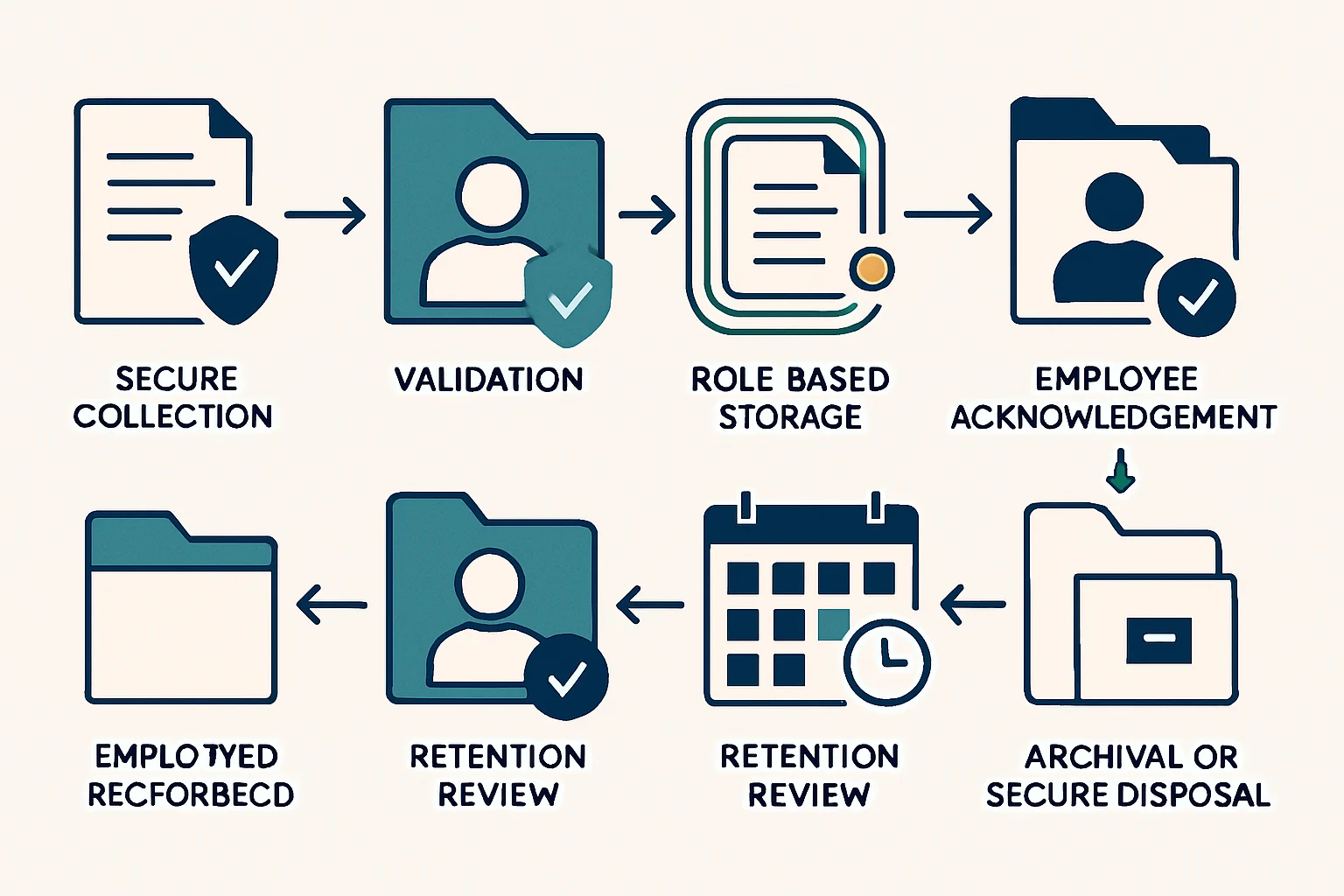
This process map shows how collection, governance and disposal should remain connected rather than becoming separate administrative tasks.
- Collection Secure request or document generation
- Validation Completeness and authorization checks
- Classification Employee link, type and sensitivity
- Storage Controlled repository and permissions
- Acknowledgement Version-specific response evidence
- Retention Review Active, archived, held or eligible
- Disposal Authorized deletion or destruction record
HR Document Control System: Access, Confidentiality and Audit Trails
Security depends on more than a password-protected folder. Therefore, the HR document management solution needs defined permissions, meaningful audit events and an accountable review process.
Need-to-Know Access for HR Records
Define access by job role, document category and business purpose. A manager may view an approved policy acknowledgement while being excluded from compensation, medical or investigation records.
- Separate employee, manager and HR views
- Restrict exceptional categories
- Review access after role changes
Useful Audit Events
Record meaningful actions such as upload, classification change, permission change, download, acknowledgement, archive and disposal approval. However, audit logs are useful only when someone can interpret and review them.
- Identify the actor and timestamp
- Retain a record reference
- Capture the action outcome
Controlled Exceptions
Some situations require temporary access, delegated review or a retained copy beyond the normal schedule. Consequently, exceptions should have a reason, approver, expiry date and follow-up action rather than an informal workaround.
- Use time-limited access where possible
- Record decision ownership
- Review unresolved exceptions
Employee File Management Solution: Requests and Acknowledgements
An HR document management solution is most valuable when it handles predictable coordination while people retain responsibility for document content and exceptions.
Request Missing Documents
A request workflow can issue a secure upload link or controlled form, explain what is needed, set a due date and send proportionate reminders. For example, HR may request a missing right-to-work item or updated personal detail without manually tracking every email response.
- Show the required document type
- Prevent incomplete submissions where practical
- Escalate only overdue or exceptional cases
Prove the Right Version
An e-signature or acknowledgement process should connect the response to a specific document version, recipient, timestamp and completion status. However, an acknowledgement confirms receipt or acceptance only where the policy and legal context support that interpretation; it does not replace appropriate human review.
- Lock the acknowledged version reference
- Record decline or non-response paths
- Keep signed outputs with the employee record
HR Records Management System: Retention and Secure Disposal
A retention schedule converts a general intention to keep records responsibly into operational decisions that a team can apply consistently.
Keeping every HR document indefinitely can create unnecessary privacy, security and discovery exposure, while disposing of a record too early can undermine an employment, tax, contractual or legal obligation. Therefore, an HR document management solution needs a documented retention rule for each category, based on applicable requirements, organizational policy and the purpose for which information is held.
Automation can calculate review dates from hire date, document expiry, employment end date or case closure. However, it should not make irreversible disposal decisions without safeguards. A legal hold, active dispute, investigation or audit requirement may pause the normal route, so an HR, legal or records owner should review exceptions before final disposal.
For paper records, secure disposal may involve controlled collection and destruction. For digital records, the process may require removal from the authoritative repository, backup handling under policy and a disposal log. The implementation varies by storage architecture, but the decision should remain traceable.
Employee Document Management System for Onboarding and Offboarding
An HR document management solution is most effective when connected to the moments that create, change and close employment records.
New-Hire File Readiness
New hires often submit contracts, policy acknowledgements, identity documents and payroll information through separate emails or forms, leaving HR to reconcile what is still missing.
Create a controlled onboarding case that requests required documents, validates completion, classifies approved files and notifies HR only when manual review is needed.
As a result, this approach can give HR and the employee a clearer view of outstanding requirements while creating an organized initial employee record.
Technology: Workflow automation, secure forms, document repository and HR-system integration.
Employee onboarding automationDeparture Record Closure
At employment end, records may remain in active folders without a defined retention trigger, while access permissions and employee self-service access may continue longer than intended.
Use a controlled offboarding event to update the employee record state, limit access according to policy, preserve required files and initiate retention review dates.
Consequently, this can help organizations separate active employment administration from records that must be retained, archived or reviewed for disposal later.
Technology: HR event integration, role-based access controls and records-retention workflow.
Implementation Checklist for an HR Document Control System
Resolve policy and ownership decisions before selecting tools or migrating large volumes of files.
- Inventory record categories
First, list current document types, locations, business purpose, sensitivity and known duplicate sources.
- Assign accountable owners
Then, define who owns the record category, permission model, retention rule and exception route.
- Define minimum metadata
In addition, set consistent fields such as employee reference, document type, status, effective date and retention category.
- Map sensitive access paths
Identify where medical, payroll, identity, legal or employee-relations records need separate treatment.
- Design request and review flows
Specify required documents, reminders, validation rules, manual-review points and escalation paths.
- Test realistic exceptions
For example, test missing documents, duplicate uploads, employee transfers, legal holds, role changes and disputed records.
- Plan migration carefully
Decide which legacy files should be migrated, archived, disposed of or reviewed before being brought into a new structure.
- Prepare governance reviews
Finally, schedule reviews for permissions, retention exceptions, failed workflow runs and policy changes.
Choosing Technology for an HR Records Management System
The right architecture depends on document volume, integrations, confidentiality needs, support capacity and the complexity of employee-file rules. Choose the technology around the record model rather than a trend.
Configured Content Platform
A secure content and collaboration platform may suit organizations that need controlled repositories, metadata, permissions and records policies with limited bespoke process logic.
Workflow and Integration Layer
Similarly, a low-code or integration platform can connect HR systems, forms, signature services, repositories and notification channels for repeatable requests and status management.
Workflow automation consultingCustom Case Management
In contrast, a custom application may be appropriate when the organization requires complex roles, unusual lifecycle rules, multiple systems of record or a tailored employee and HR experience.
Custom workflow automationBuild an Employee File Management Solution That Remains Useful
The goal is dependable record handling, not more places for files to live.
An effective HR document management solution connects collection, validation, classification, restricted access, acknowledgement, retention review and authorized disposal. As a result, HR teams can spend less time searching across messages and folders and more time resolving exceptions that need judgement.
Start with records carrying the highest confidentiality, compliance or operational risk. Then standardize ownership, permissions and retention rules before extending the model to lower-risk categories. This measured approach supports adoption while leaving room for legal, privacy and employee-relations review where automated rules alone are not enough.
FAQ: Planning an Employee Document Management System
These questions address common planning issues for HR, IT and compliance teams.
An HR document management solution combines processes and technology to collect, organize, secure, retrieve, retain and dispose of employee-related records. It should define document ownership, classifications, access permissions, version control, acknowledgement evidence and retention actions.
The answer depends on local obligations and organizational policy. However, identity records, bank and tax details, health or accommodation information, disciplinary materials, investigations and certain compensation records commonly need more restricted access than general employment documents.
Yes. A workflow can request documents, provide secure submission routes, validate required information, send reminders and record completion status. However, human review should remain for authenticity checks, sensitive information, policy interpretation and unusual cases.
Retention periods vary by record type, jurisdiction, contractual obligations, tax requirements, employment law, privacy obligations and active legal matters. Therefore, organizations should use an approved retention schedule and involve HR, legal, privacy or records specialists when setting or changing rules.
An e-signature or acknowledgement can provide evidence that a person completed a stated action on a particular version at a particular time. Whether that proves understanding, agreement or informed consent depends on the wording, context, policy and applicable legal requirements.
Make Document Handling Easier to Govern
Turn document requests, employee-file controls and lifecycle actions into a practical workflow built around your operating requirements.
JiyanaTech can assess your current HR document management solution process and design a maintainable automation solution around your systems, controls, integrations, security and support needs.
Discuss This Workflow